 Today in Tech
How to relieve eye fatigue caused by your computer screen

After finishing up a hard day's work, many of us come home bleary-eyed with a raging headache — but we don't have to. In this digitally-inclined era, most people spend the lion's share of a work day online, parked in front of a computer. And all of that online activity — from digging through a bloated inbox to tinkering around in a spreadsheet — means staring at a bright, back-lit screen for hours on end.
Common complaints like red, irritated eyes, headaches, neck pain, and blurred vision are all underlying symptoms of Computer Vision Syndrome, a widespread medical condition common in these high tech times. Unfortunately, going home doesn't exactly spell relief; odds are you unwind in front of a screen too. Since you're probably not going to be giving up that iPad or 60" HDTV any time soon, you may want to consider finding ways to give your eyes a break.
If you're willing to buy an accessory to tackle your ailing eyes head-on, there are a few products worth considering, all with different approaches. If you'd rather stay thrifty, you've got even more options — read on below!
Halo 6 LED Bias Lighting Kit
Price: $12.95 at Antec
I spent some time testing out Antec's Halo Bias Lighting Kit to see how useful it was in giving my weary eyes a break. The Halo is essentially a set of 6 tiny LED lights strung together on an adhesive strip. It employs a technique called "bias lighting" that creates a soft white glow around your screen, reducing eye fatigue by "increasing perceived image clarity."
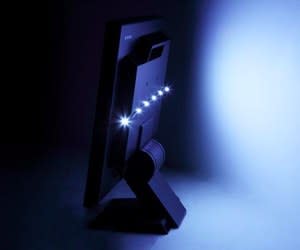
The strip is placed on the back of your computer monitor and is powered by your computer's USB port, emanating a white light glow from behind the screen that lives up to the product's angelic name. At $13, the Halo Bias Lighting Kit is quite affordable, and it's compatible with screens up to 24". Of course, not everyone wants to glue a sticky strip of anything onto a computer component, much less a laptop. The advantage? The lighting kit doesn't take up any precious desk space whatsoever.
While the Halo Bias Lighting Kit did provide a pleasantly soft, diffuse white light, its positive effects were only really notable in a very dark room — trying it out in my home office at night, it did soften the blow of a bright computer screen. Unfortunately, in daylight its effects weren't really noticeable, and that rules out eye relief from 9 to 5 for most people. And while my eyes were pleased by the white glow it radiated, I'm not convinced that a lamp with a clear bulb positioned behind my computer wouldn't suffice Of course, at $13, the Halo kit is probably cheaper (and less obtrusive).
3M Glare Reducing Task Light
Price: $97 on Amazon
3M's glare-busting lamp takes a different tack by fighting screen glare — a well-known enemy to eye comfort. Compared to the Halo Kit, 3M's Task Light is a far more flexible option, since you can move it around anywhere you'd like. It has the added benefit of being perfectly compatible with a laptop, since you're probably not going to be slapping the sticky Halo LED kit onto the back of your shiny new MacBook. The Task Light relieves your eyes by neutralizing glare on your screen with a polarizing filter just like you might find on a pro photographer's lens. Of course, at around $100, you'll have to be willing to pay for the lamp's versatility and superior polarizing filter.
Anti-glare screen filter
Price: Variable
If glare really has your eyes hurting, a screen filter is another option. Since the filter will need to fit your particular screen, these vary widely in price — but don't pay through the nose for one. If you'd prefer something that snaps onto your monitor and stays there, an anti-glare filter might be up your alley — especially if your home or office windows let in intense direct sunlight from the east or west.
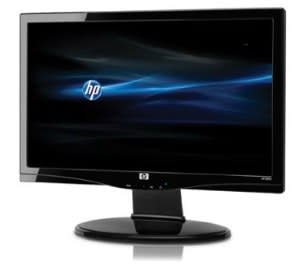
HP S2031 20" LCD Monitor with anti-glare panel
Price: $129.99 through HP
If you're planning on computer or monitor shopping any time soon, consider a matte screen or "anti-glare" screen. These days, most devices come with a glossy screen that makes contrast and color pop, but opting for a matte screen will spare your eyes. Matte screens are a bit out of style at the moment, so you might have to hunt a bit, though this HP model is a good starting place. If you're looking for a full-on computer, Apple's 15" and 17" MacBook Pro laptops offer an anti-glare screen option, but it'll set you back $150.
No-cost ways to reduce glare If you're not ready to pony up the cash or you'd rather experiment on your own, there are plenty of ways to fight eye fatigue that won't cost you a dime. If glare is your problem, be sure to turn off overhead lights and face your screen away from direct sunlight. Keeping your monitor or laptop lid at a 90 degree angle can also mitigate the glare from nearby light sources.
Adjust settings and your environment If glare isn't the culprit, there are plenty more tricks that will make your weary eyes thank you. Erica Dixon, Visual Neuroscience researcher at American University, suggests that trial and error can be the best method. "Unfortunately, there are so many causes of eye strain that it's impossible to say what would help everyone, but there are certainly easy solutions to try," Dixon said. "Try out different settings on your computer, spend an hour or two with the screen at a lower brightness level and see if that feels better. Just play around and find what feels best for you."
Experimenting with lighting in the environment can't hurt either — swap a bulb or move a harsh light source to find a good balance."Think of how you physically feel yourself straining to see a screen if there is too much sunlight coming in to the room and how much better it feels when you put down the shades," said Dixon. "The less competition your screen has from sources that irritate your eyes, the better."
Calibrate your screen
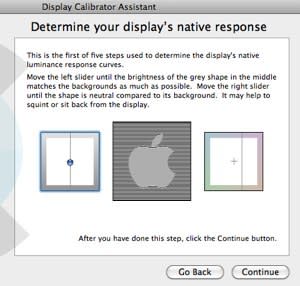
While there's no silver bullet when it comes to eye fatigue, Dixon also stressed the importance of calibrating your screen. "Calibrating your computer means that images are displayed as they are meant to be seen, with accurate colors, brightness, and contrast."
Many external monitors include this feature in the settings menu. If you're working on a Mac, a built-in tool called Display Calibrator Assistant walks you through this, step-by-step. You can find the tool by opening System Preferences > Displays then choosing the Color tab and clicking Calibrate. On other computers, a web tool called Screen Check can perform the same function. Don't be afraid to explore the settings to decide what looks right for you.
Take a break Beyond screen calibration, there are even more basic, simple tricks to give your eyes a break. If you wear contacts, switch to glasses while you're on the computer to keep your eyes from becoming dried out and irritated. One trick called the "20-20-20 rule" suggests that every 20 minutes you should look at an object 20 feet away for 20 seconds.
If you can't commit to such a strict routine, just taking short, frequent breaks from your screen can do wonders for your straining vision. If you're prone to getting absorbed in work, simply set a recurring alarm on your phone that reminds you to get up, take a stroll, and get away from the computer — your eyes will thank you.
More from Tecca:
